 niccleave

Ghosting and ringing are common surface-quality issues that can affect FDM 3D printing results, especially when machines operate at higher speeds or produce detailed models. These visible patterns often appear as repeated echoes around sharp edges, corners, or surface features. For businesses using 3D printing for prototypes, functional parts, or small-batch production, reducing these defects is important for maintaining consistent output quality.
Understanding Ghosting and Ringing in 3D Printing
Ghosting and ringing refer to similar visual defects caused by unwanted vibrations during the printing process. When the print head changes direction quickly, the mechanical system may continue moving slightly due to inertia. This movement can create repeated patterns next to edges or raised features on the model surface.
The severity of these issues depends on multiple factors, including printer structure, acceleration settings, belt tension, print speed, and the properties of the selected material. Choosing the right 3D printer filament material is also an important part of improving overall print stability, especially when producing parts that require consistent appearance.
Check Print Speed and Acceleration Settings
High print speeds can increase productivity, but they also place greater demands on the printer’s motion system. When the print head changes direction rapidly, excessive acceleration can amplify vibrations and create visible ringing patterns.
Reducing speed and acceleration is often one of the first troubleshooting steps. Lower acceleration settings allow the printer to make smoother movements, giving the mechanical components more time to respond. Businesses using FDM printers for production should balance throughput with surface requirements rather than relying only on maximum speed settings.
Improve Printer Mechanical Stability
A stable mechanical system is essential for accurate printing. Loose belts, unstable frames, worn rollers, or poorly adjusted components can increase unwanted movement during printing. Before changing software settings, operators should inspect the printer’s mechanical condition.
Regular maintenance is particularly important for businesses managing multiple machines. A consistent inspection process can help identify issues before they affect production. Tightening belts, checking screws, and ensuring smooth axis movement can improve print reliability and reduce defects across different jobs.
Optimize Filament Quality and Material Selection
Filament consistency influences extrusion stability and final surface quality. Variations in filament diameter, moisture absorption, or material formulation can affect how smoothly the printer deposits each layer. Using reliable PLA filament can help create a more predictable extrusion process.
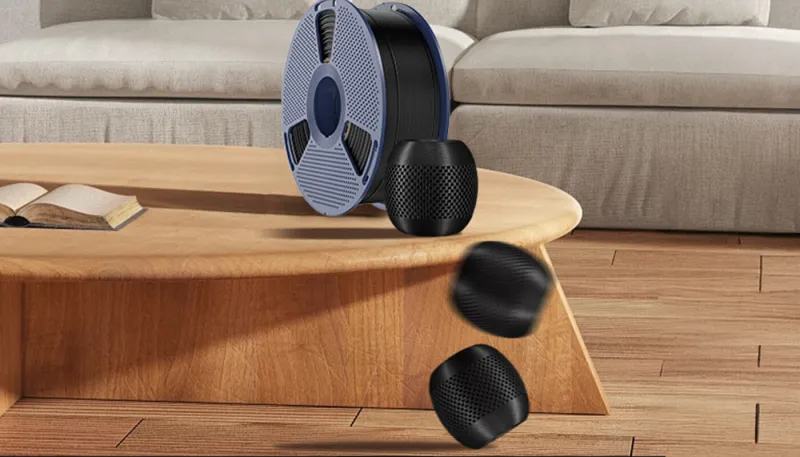
SUNLU PLA+ is designed as a reinforced and toughened PLA material, with improved toughness compared with standard PLA. The material is formulated to produce printed parts with better impact resistance and reduced risk of breakage, making it suitable for models requiring additional durability.
Reduce Vibration Through Proper Printer Setup
Printer placement can also contribute to ringing. A machine placed on an unstable surface may transfer or amplify vibrations during operation. Positioning the printer on a strong, level platform can help reduce external movement.
For professional environments, printer location should also consider surrounding equipment. Machines operating near other vibrating devices may experience additional interference. Creating a stable printing environment helps maintain consistent performance, especially when multiple printers are running simultaneously.
Adjust Printing Temperature and Extrusion Parameters
Material settings can influence how layers bond and how accurately details are reproduced. If the temperature is too low, extrusion may become inconsistent. If it is too high, excessive softness can affect sharp edges and fine features.
SUNLU PLA+ is designed with excellent flowability, supporting smooth extrusion and reducing the risk of clogging. Its easy-printing characteristics make it suitable for users who need reliable output without extensive parameter adjustments. When using any 3D printer filament material, operators should still calibrate temperature, flow rate, and cooling settings according to their specific printer.
Consider Printer Firmware and Motion Control
Modern FDM printers use firmware features that influence movement control. Functions such as acceleration management and input shaping can help reduce vibration-related artifacts on supported machines.
Businesses using professional printing systems should review whether their equipment supports these technologies. Firmware optimization combined with appropriate mechanical adjustments can improve print quality without significantly reducing productivity.
Choose Materials Based on Application Requirements
Material selection should match the purpose of the printed part. Standard PLA is popular because it is easy to print and suitable for many applications, but some functional parts may require additional toughness.
SUNLU PLA+ provides enhanced toughness compared with traditional PLA, making printed components less prone to cracking under impact. For companies producing functional prototypes, fixtures, educational models, or everyday-use components, selecting a stronger PLA filament can support more reliable final parts.
Build a Systematic Troubleshooting Process
Fixing ghosting and ringing is usually not achieved through a single adjustment. A structured approach is more effective. Operators can begin by checking mechanical stability, then adjust speed and acceleration, verify material quality, and fine-tune temperature and extrusion settings.
For businesses, documenting successful settings for different printers and materials can reduce repeated troubleshooting. A standardized process allows teams to maintain consistent output even when managing multiple machines, operators, or production schedules.
Achieving More Consistent 3D Printing Results
Ghosting and ringing are often the result of interactions between printer mechanics, movement settings, and material performance. Addressing these factors together provides a more reliable path toward better print quality.
SUNLU PLA+ offers businesses a durable PLA filament option with reinforced toughness, smooth flowability, and easy-printing characteristics. When combined with proper printer maintenance, optimized settings, and suitable workflow management, the right 3D printer filament material can help reduce surface defects and support more consistent FDM production.